Platform Engineering & Private Cloud Infrastructure 🏗️
Platform Engineering focuses on building Internal Developer Platforms (IDPs) and self-service capabilities to accelerate software delivery and reduce cognitive load for developers.
🏗️ Internal Developer Portals (IDP)
An Internal Developer Portal (IDP) is the interface through which developers configure, manage, and monitor their services and infrastructure. It serves as a unified landing zone that reduces developer cognitive load by abstracting complex cloud-native architectures.
Spotify Backstage
Backstage is an open-source framework originally built by Spotify for constructing developer portals. It centralizes all your infrastructure tooling, services, APIs, docs, and software templates into a single, cohesive developer portal.
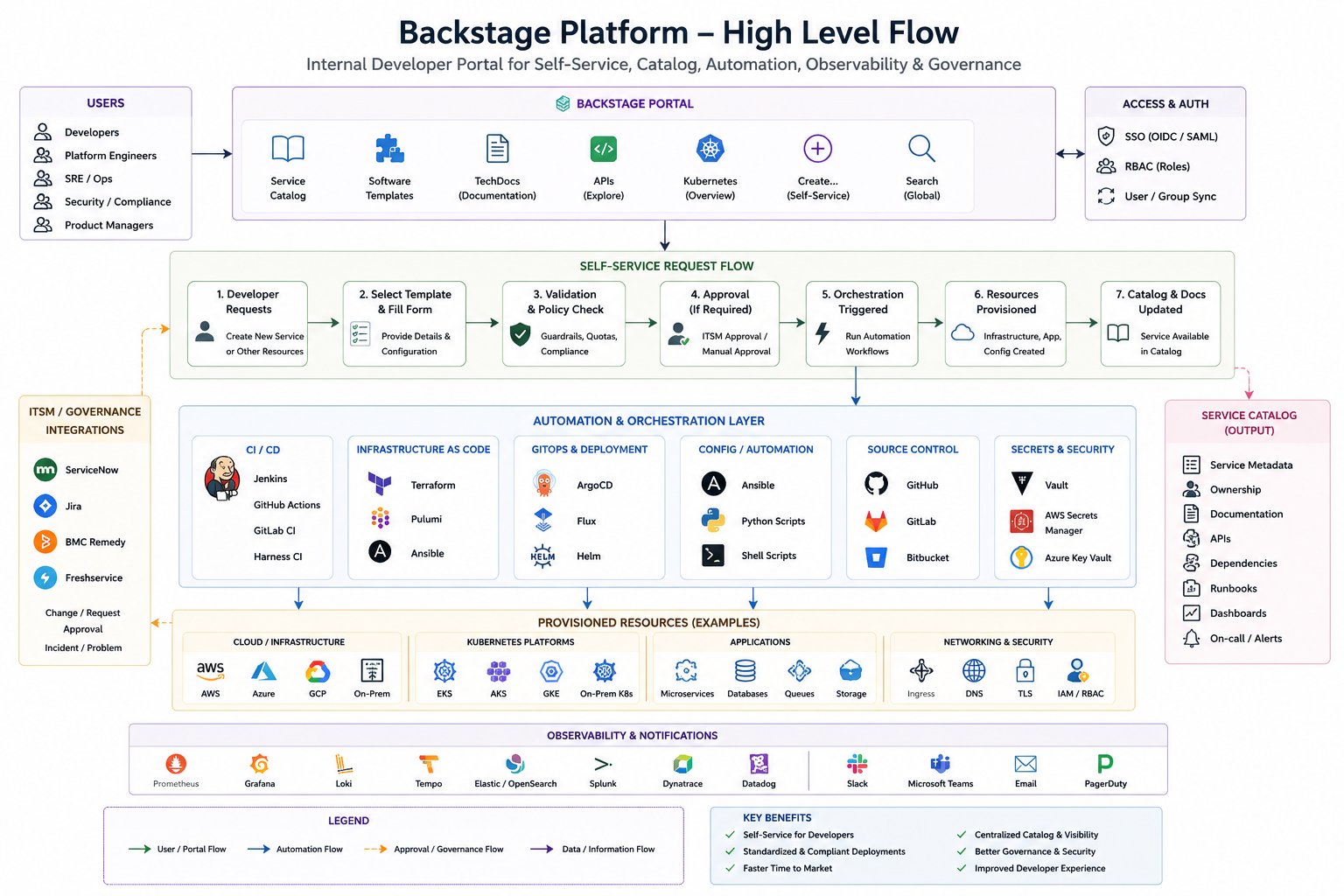
🌟 Key Benefits
- Reduced Cognitive Load: Developers don't need to master Kubernetes configs, AWS VPC details, or complex CI/CD syntax; standard workflows are packaged and abstracted.
- Standardized Service Creation: Self-service Software Templates bootstrap new services with production-ready defaults, telemetry, security scanning, and pipelines in minutes.
- Unified Service Catalog: Central repository tracks ownership, dependencies, APIs, and operational health of all services across the organization.
- Integrated TechDocs: "Docs-like-code" publishes documentation alongside repository code and renders it directly inside the Backstage UI.
⚡ Backstage vs. Jenkins: Self-Service & Architecture
Many organizations gradually turn Jenkins into a self-service portal using Active Choice Parameters, Reactive Parameters, and Groovy scripts. However, Jenkins is an automation engine, while Backstage is a developer experience portal. They solve fundamentally different problems.
High-Level Feature Comparison
| Feature | Spotify Backstage | Jenkins |
|---|---|---|
| Primary Purpose | Internal Developer Portal (IDP) | CI/CD Automation Server |
| Target Users | Developers, Platform Engineers, SREs | DevOps, Build Engineers, Platform Teams |
| UI | Modern developer portal, unified UX | Job-centric, parameter-heavy UI |
| Software Catalog | ✅ Yes, central inventory | ❌ No |
| Documentation | ✅ Yes (integrated TechDocs) | ❌ No (requires external wiki/README) |
| Self-Service Templates | ✅ Excellent, Scaffolder templates | Limited (parameterized jobs) |
| CI/CD Execution | ❌ No, delegates to external engines | ✅ Yes, native executor |
| Build Pipelines | ❌ No | ✅ Yes, native |
| Plugin Ecosystem | Developer platform & portal plugins | Build, test, and CI/CD tools |
| Kubernetes View | ✅ Yes, service-scoped resource views | Limited visibility |
| Service Ownership | ✅ Yes, metadata-linked owners | ❌ No |
| Dependency Mapping | ✅ Yes, visual relationships | ❌ No |
| Scorecards & SLOs | ✅ Yes, via plugins | ❌ No |
| Golden Paths | ✅ Yes, opinionated template paths | ❌ No |
| ITSM Integration | ✅ Yes, compliance & approval gates | Via manual scripting/plugins |
| GitOps Awareness | ✅ Yes | Limited |
Architectural Shift
Traditional Jenkins-Centric Setup: All provisioning and deployment operations start and end in the Jenkins UI.
Modern Platform Engineering Setup: Backstage serves as the entry point, orchestrating Jenkins and other specialized tools.
Jenkins becomes an execution engine among many (IaC, GitOps, etc.) rather than the user interface.🛠️ Creating a New Service: Dual Approaches
The Jenkins Parameter Maze
Developers must log into Jenkins, locate the correct job, and fill in dozens of dependent parameters.
Jenkins Job Parameters
├── Application Name (Text)
├── Namespace (Dynamic)
├── Team (Select)
├── Environment (Select)
├── CPU & Memory Limits (Dependent Selects)
├── Helm Chart Version (Select)
├── Git Repository URI (Text)
├── Database Provisioning (Checkbox -> triggers sub-forms)
├── Kafka Topics (Checkbox -> triggers sub-forms)
├── Redis Integration (Checkbox -> triggers sub-forms)
└── Alerting & Monitoring Configs (Multiple inputs)
The Backstage Solution
Instead of developers interacting directly with a complex CI/CD UI, they use a Backstage Software Template backed by a clean, validation-first UI wizard.
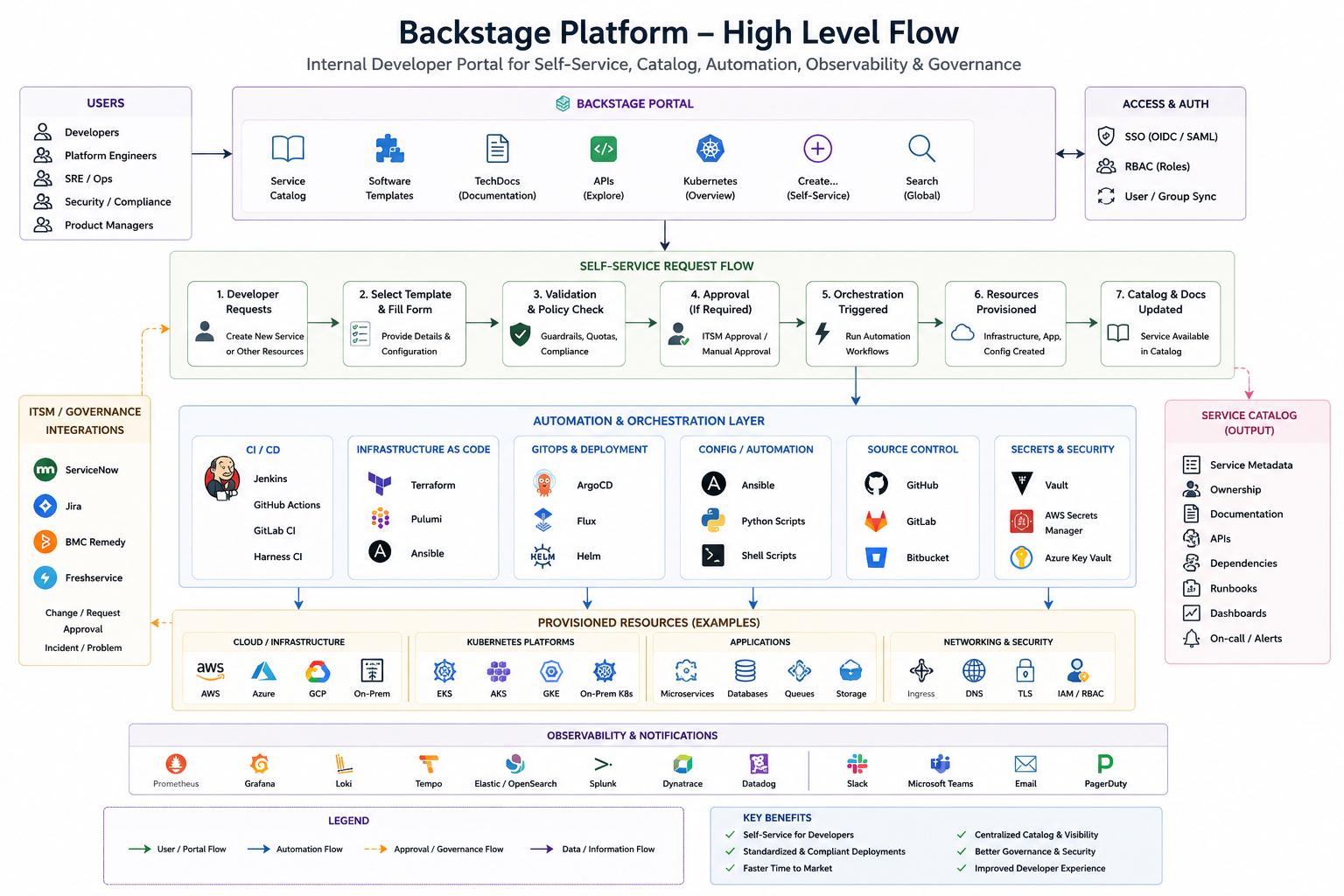
The developer fills out business-relevant fields (e.g., service name, language, cloud environment). Backstage validates these inputs in real-time and calls the Jenkins API to execute the underlying pipelines.
🔍 Deep Dive: Backstage vs. Jenkins Concepts
Service Catalog vs. Jobs List
- Jenkins: Displays a collection of jobs (
Deploy-App,Build-App,Database-Provision). Connecting these jobs to understand a service's overall status requires manual tracing. - Backstage: Displays a complete view of a service entity (e.g.,
payment-api) including its Owner, GitHub repository, ArgoCD sync status, Grafana dashboards, Splunk logs, API definitions, documentation, and dependencies.
Developer Experience (DevEx)
- Jenkins: Developers must search: Which job do I run? Which pipeline did this build deploy to? Where is the dashboard? Where is the README?
- Backstage: Developers search
"payment-api"and get everything on one page.
Documentation & Ownership
- Jenkins: Documentation is external (Confluence, Wiki, or raw READMEs). Service ownership is generally not tracked or audit-mapped.
- Backstage: TechDocs is integrated, publishing markdown documentation directly beside operational metadata. Every service has a designated owner, Slack channel, on-call rotation, and PagerDuty link.
Kubernetes Visibility
- Jenkins: Can deploy code to Kubernetes, but has limited visibility into the health of pods, deployments, and services after the deployment job completes.
- Backstage: Includes a first-class Kubernetes plugin showing Pods, Deployments, Services, Namespace health, and events directly on the service's details page.
Active Choice Parameters vs. Templates
- Jenkins: Interactive forms are built using complex Groovy scripts and parameter plugins within the build server.
- Backstage: Interactive forms are built using JSON schema templates, providing dynamic validation, help text, role-based visibility, and multi-step wizards.
ITSM Integration
- Jenkins: Often requires pipelines to make raw ServiceNow API calls, blocking execution while polling for manual approvals.
- Backstage: Approvals are natively integrated into the self-service catalog before triggering the execution pipeline.
❓ Does Backstage Replace Jenkins?
No. Think of the relationship like this: * Backstage = The reception desk and developer portal (where developers request resources and discover services). * Jenkins = The factory floor (where builds, tests, and automation are executed).
If you already have sophisticated Jenkins jobs with Active Choice parameters, you don't throw them away. Instead, Backstage replaces the user-facing forms, invoking those same Jenkins jobs via APIs or webhooks. Platform engineers and SREs can still use the raw Jenkins UI for administrative tasks, while developers enjoy an abstracted, painless self-service experience.
🔄 Backstage ITSM & Governance Integration
For enterprise environments (like banking or fintech), security and compliance require strict approval workflows before production provisioning. Backstage integrates directly with IT Service Management (ITSM) systems like ServiceNow, Jira Service Management, BMC Remedy, or Freshservice.
Automated Approval & Provisioning Flow
Auto-approves Standard changes,
Flags Emergency/Normal for approval ITSM-->>Plugin: Return Ticket ID and Status (Approved or Pending) alt Ticket Approved (Auto or Manual) Plugin->>CI: Trigger Pipeline with Ticket ID reference CI->>Infra: Provision Cloud Resources (Terraform / Pulumi) Infra-->>CI: Success CI->>ITSM: Update Ticket Status to Completed/Closed CI->>BS: Register service in Catalog & TechDocs BS-->>Dev: Service ready! URL: http://app.domain.com else Ticket Pending Approval BS-->>Dev: Ticket created (SR-12345) & pending CAB / Manager approval ITSM->>ITSM: Approver approves change ITSM->>Plugin: Webhook notification of state change Plugin->>CI: Trigger Pipeline execution CI->>Infra: Provision resources CI->>ITSM: Close Ticket CI->>BS: Register service in Catalog BS-->>Dev: Service ready! end
CMDB Synchronization
When a new service (e.g., payment-api) is created via Backstage, the system automatically registers the repository metadata, namespace, database resources, and owner group directly in your Configuration Management Database (CMDB). This eliminates manual updates and ensures audit logs are always complete.
🔐 Backstage Access Control: SSO (Azure AD) & RBAC
To deploy Backstage in a secure enterprise environment, organizations implement single sign-on (SSO) and Role-Based Access Control (RBAC) to govern who can view, modify, or provision infrastructure resources.
🔑 SSO Integration: Azure AD (Microsoft Entra ID)
Backstage natively integrates with Azure AD (Microsoft Entra ID) via OAuth 2.0. This allows developers to log into the portal using their enterprise credentials and maps Azure AD Security Groups to Backstage Team memberships automatically.
⚙️ app-config.yaml Authentication Configuration
auth:
  providers:
    microsoft:
      development:
        clientId: ${AUTH_MICROSOFT_CLIENT_ID}
        clientSecret: ${AUTH_MICROSOFT_CLIENT_SECRET}
        tenantId: ${AUTH_MICROSOFT_TENANT_ID}
        # Backstage resolves Azure AD groups to ingest catalog users/groups
        signIn:
          resolvers:
            - resolver: emailMatchingUserEntityProfileEmail
            - resolver: emailLocalPartMatchingUserEntityName
🔄 Ingesting Users & Groups (Microsoft Graph API)
Backstage uses the microsoft-graph-org provider to synchronize Microsoft Entra ID groups and users into the catalog database, maintaining a real-time record of active teams and organizational hierarchies.
🛡️ Role-Based Access Control (RBAC)
Backstage utilizes a policy-based permission system (@backstage/plugin-permission-node and @backstage/plugin-rbac-backend) to define granular access control rules. Roles are mapped to catalog users and groups:
Key Standard Roles
viewers(Default)- Scope: Read-only access to the Software Catalog and TechDocs.
- Permissions: Can search for APIs, read documentation, and view build status. Cannot register new components or trigger software provisioning templates.
admins(Team Space Admins)- Scope: Read/Write access scoped to specific team namespaces and spaces.
- Permissions: Can register and deprecate service entities owned by their team, manage team membership, and trigger standard Software Templates for their assigned environment namespaces.
global_admin(Platform Administrators)- Scope: Unrestricted system-wide access.
- Permissions: Can manage global portal settings, install and configure backend plugins, define new custom Software Templates, override approval gates, and modify RBAC permission policies.
🗂️ Namespace-Based & Team Space Scoping
To prevent clutter and maintain security boundary compliance, Backstage components, templates, and systems can be organized into distinct Namespaces (similar to Kubernetes namespaces).
Scoping Catalog Views by Team Namespace
By default, developers belong to specific team spaces (e.g., payments-team, checkout-team). You can configure permission policies to ensure that a developer can only view or manage resources scoped to their own team space:
// Example: Custom Backstage Permission Policy
class ScopedCatalogPermissionPolicy implements PermissionPolicy {
  async handle(request: PolicyAuthorizeQuery, user?: BackstageUser): Promise<PolicyDecision> {

    // 1. Allow global_admin to perform any action
    if (user?.ownershipEntityRefs.includes('group:default/global_admin')) {
      return { result: AuthorizeResult.ALLOW };
    }

    // 2. Protect Software Template execution (Scaffolder)
    if (isPermission(request.permission, scaffolderTemplateExecutePermission)) {
      // Check if developer has admin or authorized role for this namespace
      return {
        result: AuthorizeResult.CONDITIONAL,
        rule: 'HAS_ORGANIZATIONAL_OWNERSHIP'
      };
    }

    // 3. Scope Service Catalog Visibility by Namespace/Team Space
    if (isPermission(request.permission, catalogEntityReadPermission)) {
      return {
        result: AuthorizeResult.CONDITIONAL,
        conditions: {
          anyOf: [
            // Rule: Matches entity owner to developer's group ref
            {
              rule: 'IS_ENTITY_OWNER',
              params: {
                claims: user?.ownershipEntityRefs ?? [],
              },
            },
            // Rule: Matches global shared read components
            {
              rule: 'HAS_LABEL',
              params: {
                label: 'visibility',
                value: 'public',
              },
            }
          ]
        }
      };
    }

    return { result: AuthorizeResult.ALLOW };
  }
}
This guarantees that:
* A member of the Payments Team only sees and interacts with payment APIs, database instances, and templates assigned to their namespace space.
* Production-level deployment templates can be restricted to members with an authorized admin claim, preventing unauthorized environment creation.
🗺️ System Positioning in Your Stack
Here is how Backstage integrates into a modern SRE/DevOps stack:
                Developers
                     │
                     ▼
              Backstage Portal
                     │
     ┌───────────────┼────────────────┐
     │               │                │
     ▼               ▼                ▼
 Service Templates  Catalog      Documentation
     │
     ▼
 Approval (ServiceNow / Jira)
     │
     ▼
 Jenkins / Harness / GitHub Actions
     │
     ▼
 Terraform • Pulumi • Ansible
     │
     ▼
 GitHub • Kubernetes • ArgoCD • Helm
     │
     ▼
 Prometheus • Grafana • Dynatrace • Splunk
👥 Platform Personas & Use Cases
| Persona / Team | Core Backstage Use Cases |
|---|---|
| Developers (General) |
|
| Android & iOS Developers |
|
| QA Team |
|
| Performance Testing |
|
| Security Engineers |
|
| SOC (Security Operations Center) |
|
| SRE (Site Reliability Engineering) |
|
| DevOps Team |
|
⚖️ Internal Developer Portal (IDP) Alternatives & Comparison
While Spotify Backstage is the most popular open-source IDP, it is not the only option. Selecting the right platform depends on whether you prioritize open-source flexibility, ease of operations, or integrations with your current tooling.
Comparison Table of IDP Platforms
| Product | Type | Best For | Open Source |
|---|---|---|---|
| Spotify Backstage | Internal Developer Portal | Large enterprises, maximum customization | ✅ Yes |
| Port | Internal Developer Portal | Fast deployment, low operational maintenance | ❌ No (SaaS/Commercial) |
| Humanitec | Platform Orchestrator | Large Platform Engineering teams, environment orchestration | ❌ No (Commercial) |
| Cortex | Service Catalog | Microservices governance, maturity scorecards | ❌ No (Commercial) |
| OpsLevel | Service Catalog + Scorecards | Developer governance, readiness checklists | ❌ No (Commercial) |
| Roadie | Managed Backstage | Organizations wanting Backstage without the operations | ❌ SaaS |
| Harness IDP | Internal Developer Portal | Teams already heavily invested in Harness CI/CD | ❌ No (Commercial) |
| Atlassian Compass | Developer Portal | Jira/Confluence-heavy ecosystems | ❌ No (Commercial) |
1. Spotify Backstage (Most Popular)
- Strengths: Highly customizable open-source framework with thousands of pre-built community plugins (Kubernetes, Jenkins, ArgoCD, GitHub, TechDocs). Gives you 100% control over the codebase and extensions.
- Weaknesses: Self-hosted. Requires continuous upgrades and node maintenance. Building custom plug-ins requires React and TypeScript expertise.
2. Port
- Strengths: Designed as "Backstage without the operational headache." Very polished user interface, little to no setup/operations overhead, and strong enterprise support.
- Weaknesses: Commercial licensing. Offers less code-level flexibility compared to Backstage.
3. Humanitec
- Strengths: Specifically focused on platform orchestration rather than just cataloging. Excellent at environment provisioning, multi-cloud setups, and resource orchestration using Terraform, Pulumi, and Helm.
- Weaknesses: Pure orchestrator rather than a traditional developer-facing portal or service catalog.
4. Cortex
- Strengths: Strong focus on engineering maturity, displaying service ownership, documentation progress, reliability metrics, and SLO tracking in one interface.
- Weaknesses: Less focused on self-service provisioning workflows.
5. OpsLevel
- Strengths: Popular service catalog tool for tracking ownership, service maturity checklists, and production readiness benchmarks.
- Weaknesses: Lacks the robust code-scaffolding and provisioning capabilities of Backstage.
6. Roadie
- Strengths: A fully managed, hosted SaaS version of Backstage. You get the benefits of the Backstage plugin ecosystem without having to run and upgrade the portal code yourself.
- Weaknesses: Limited code-level customization compared to running Backstage in your own cluster.
7. Harness IDP
- Strengths: Extremely tight out-of-the-box integration with Harness CI/CD pipelines, templates, and approval gates.
- Weaknesses: Best suited for teams already using the Harness ecosystem; less suitable for heterogeneous toolsets.
8. Atlassian Compass
- Strengths: Best fit for organizations heavily centered on Jira, Confluence, and Bitbucket.
- Weaknesses: Less mature than Backstage or Port when it comes to orchestrating custom provisioning workflows.
📊 Feature Matrix
| Feature | Backstage | Port | Humanitec | Harness IDP | Atlassian Compass |
|---|---|---|---|---|---|
| Open Source | ✅ | ❌ | ❌ | ❌ | ❌ |
| Self Service | ✅ | ✅ | ✅ | ✅ | Limited |
| Software Templates | ✅ | ✅ | Limited | ✅ | ❌ |
| Service Catalog | ✅ | ✅ | Partial | ✅ | ✅ |
| TechDocs | ✅ | ❌ | ❌ | ❌ | Limited |
| Kubernetes | Excellent | Excellent | Excellent | Excellent | Good |
| Jenkins | Excellent | Good | Good | Excellent | Limited |
| Terraform | Excellent | Excellent | Excellent | Good | Limited |
| Pulumi | Excellent | Good | Excellent | Limited | Limited |
| ArgoCD | Excellent | Good | Good | Good | Limited |
| GitHub | Excellent | Excellent | Good | Excellent | Good |
| ITSM Integration | Excellent | Excellent | Good | Good | Limited |
| Plugin Ecosystem | Huge | Smaller | Small | Small | Small |
🎯 Which IDP Fits Your Environment?
Given a modern SRE and DevOps environment leveraging Jenkins, Harness, GitHub, ArgoCD, Terraform, Pulumi, Helm, Kubernetes, Ansible, Grafana, Prometheus, Splunk, Dynatrace, and ServiceNow/Jira, you do not need to replace your stack—you need a single entry point: * Choose Backstage if you want maximum control, zero vendor lock-in, and have the capacity to build and run the portal using your platform team. It lets you wrap existing Jenkins, Terraform, and GitOps pipelines in simple forms without changing anything underneath. * Choose Port or Roadie if you want a faster rollout without the operational burden of managing and upgrading Backstage. * Choose Harness IDP if Harness is your primary pipeline and control plane, reducing custom integration effort. * Choose Cortex or OpsLevel if your immediate priority is governance, service ownership, and scorecards rather than custom software templates.
❓ Spotify Backstage FAQs
1. What is Backstage?
Backstage is an Internal Developer Portal (IDP) originally developed by Spotify. It serves as a single portal containing a Software Catalog, Software Templates, TechDocs, and self-service automation options to unify the developer experience.
2. Is Backstage a CI/CD tool?
No. Backstage does not replace CI/CD tools; it orchestrates them. It integrates with Jenkins, Harness, or GitHub Actions by calling their APIs to execute pipelines.
3. Does Backstage replace Jenkins?
No. Backstage acts as a frontend dashboard. Jenkins remains the automation execution engine, triggered via API calls from Backstage actions.
4. Does Backstage replace ArgoCD?
No. Backstage integrates with ArgoCD. It can create new ArgoCD applications, display sync/health status, and trigger manual syncs, but ArgoCD continues to execute the actual GitOps reconciliations.
5. Does Backstage replace Terraform or Pulumi?
No. Backstage triggers pipelines or jobs that run Terraform or Pulumi scripts to provision infrastructure.
6. Does Backstage replace Helm?
No. It can generate Helm chart templates when creating a new repository, but Helm is still used to package and install the application on Kubernetes.
7. Does Backstage replace the Kubernetes Dashboard?
No, but it includes Kubernetes plugins that display pod statuses, deployments, ReplicaSets, HPA scaling, namespaces, and events directly on the service's details page.
8. Does Backstage replace Grafana?
No. It embeds Grafana charts and links dashboards to specific service catalog cards so developers can access metrics in context.
9. Does Backstage replace Prometheus?
No. It consumes Prometheus metrics via plugins to show service performance directly in the portal.
10. Does Backstage replace ServiceNow?
No. It integrates with ITSM platforms like ServiceNow to automate ticket creation, change approvals, and CMDB syncs while executing infrastructure pipelines.
11. Does Backstage replace Jira?
No. It integrates with Jira to display issues, link projects to catalog components, track sprint progress, and auto-create project boards.
12. What problem does Backstage solve?
Without Backstage, developers jump between dozens of systems (GitHub, Jenkins, Grafana, ServiceNow, Confluence, etc.). Backstage unifies all these interfaces into a single pane of glass.
13. What is the Software Catalog?
It is a centralized index of all software assets (services, libraries, websites, APIs, pipelines) running in an organization, listing their ownership, dependencies, and metadata.
14. What is the Scaffolder?
The Scaffolder is the engine behind Software Templates. It lets developers automate the creation of new services with pre-configured Git repositories, CI/CD pipelines, and infrastructure.
15. What are Software Templates?
They are standardized "golden path" templates (e.g., Python API, Java Microservice, React SPA) defined in YAML that developers use to bootstrap projects quickly and safely.
16. What is TechDocs?
TechDocs is a "Docs-like-code" solution where markdown files stored inside service repositories are automatically compiled (via MkDocs) and rendered inside the Backstage UI.
17. What is a Golden Path?
A Golden Path is an opinionated, organization-approved development journey that makes it easy for developers to deploy secure, reliable services without having to figure out configuration details themselves.
18. Does Backstage support RBAC?
Yes. It supports Role-Based Access Control to customize permissions for Developers, QAs, SREs, Security, and Administrators.
19. Does Backstage support SSO?
Yes. It natively supports OpenID Connect and OAuth providers like Microsoft Entra ID (Azure AD), Google Workspace, Okta, and GitHub.
20. Can Backstage create GitHub repositories?
Yes. Through Scaffolder actions, Backstage can create new GitHub repositories, assign CODEOWNERS, establish branch protection rules, and configure repository secrets.
21. Can Backstage create Kubernetes namespaces?
Yes, indirectly. Backstage triggers automation tools (like Jenkins, Terraform, or Ansible) which in turn call the Kubernetes API to create the namespace.
22. Can Backstage provision cloud resources?
Yes. By triggering IaC pipelines (Terraform/Pulumi/Ansible), it allows developers to provision cloud databases, storage, and networking through a simple UI form.
23. Can Backstage create databases?
Yes. Through database software templates, it triggers pipelines that execute Terraform resources or Ansible plays to spin up PostgreSQL, MySQL, RDS, or MongoDB instances.
24. Does Backstage support Kubernetes?
Yes. It has a first-class Kubernetes plugin that aggregates resource states from multiple clusters, showing pod logs, deployment statuses, and scaling metrics.
25. Can Backstage trigger Jenkins jobs?
Yes. The Backstage Jenkins plugin allows triggering builds, listing job histories, and rendering logs directly in the service dashboard.
26. Can Backstage trigger ArgoCD Sync?
Yes, using the ArgoCD plugin.
27. Can Backstage trigger GitHub Actions?
Yes, through GitHub API integrations.
28. Can Backstage integrate with Harness?
Yes. It can integrate with Harness pipelines via APIs or custom plugins.
29. Can Backstage integrate with Vault?
Yes. Workflows can securely fetch secrets or configure Vault paths during service onboarding.
30. Can Backstage integrate with ITSM?
Yes, supporting ServiceNow, Jira Service Desk, BMC Remedy, and Freshservice.
31. Can Backstage replace Confluence?
Partially. TechDocs replaces code and service documentation, but general company directories, wikis, and business docs are still best kept in Confluence.
32. Does Backstage eliminate Jenkins Active Choice Parameters?
Mostly yes for developer-facing self-service. Developers use simple multi-step wizards in Backstage, and Backstage passes these validated parameters to the backend Jenkins API, removing the need for reactive parameter interfaces in Jenkins.
33. Can Backstage work with multiple Kubernetes clusters?
Yes. It can aggregate and display logs and resource states across multiple EKS, AKS, GKE, or on-prem clusters.
34. Can Backstage support multi-cloud?
Yes. It acts as a single control plane visualizing services running across AWS, GCP, Azure, and on-premises environments.
35. Is Backstage suitable for a banking/fintech platform?
Yes. It is commonly adopted to standardize developer workflows, enforce security guardrails, and mandate ITSM approval checks (like ServiceNow Change Requests) before executing deployments in compliance-heavy industries.
🔑 Infrastructure as Code (IaC) Tools
- Terraform: The leading open-source declarative infrastructure provisioning tool.
- Pulumi: Reimagining IaC by allowing developers to write infrastructure configs using programming languages like Python and TypeScript.
- Ansible: Automating server provisioning and configuration management.
🌐 Hybrid, Private & Multi-Cloud Platforms
Modern platforms span across public clouds and self-hosted infrastructure: * Public Clouds: AWS, GCP, and Microsoft Azure. * Private Cloud (OpenStack): Deploying and managing scalable compute, storage, and networking resources inside your own data centers using OpenStack. * Networking & BGP: Implementing robust software-defined networks (SDNs). Leveraging BGP (Border Gateway Protocol) routing to peer private cloud networks with enterprise WANs and public cloud endpoints.